wget https://byte-unixbench.googlecode.com/files/UnixBench5.1.3.tgz
tar zxf U
make
./Run
自己记录下,这么几个命令敲了无数遍还错,shit~~~
/etc/sysconfig/network-scripts/ifcfg-eth0
DEVICE=eth0
ONBOOT=yes
BOOTPROTO=dhcp
或者使用netconfig配置动态地址
然后运行# service network restart
我想我是能看懂
# CentOS-Base.repo
#
# mv /etc/yum.repos.d/CentOS-Base.repo/etc/yum.repos.d/CentOS-Base.repo.bak
#yum makecache
# This file uses a new mirrorlist system developed by Lance Davis for CentOS.
# The mirror system uses the connecting IP address of the client and the
# update status of each mirror to pick mirrors that are updated to and
# geographically close to the client. You should use this for CentOS updates
# unless you are manually picking other mirrors.
#
# If the mirrorlist= does not work for you, as a fall back you can try the
# remarked out baseurl= line instead.
#
#
[base]
name=CentOS-$releasever – Base
baseurl=http://mirrors.163.com/centos/6.0/os/$basearch/
gpgcheck=1
gpgkey=http://mirrors.163.com/centos/RPM-GPG-KEY-CentOS-6
#released updates
[updates]
name=CentOS-$releasever – Updates
baseurl=http://mirrors.163.com/centos/6.0/updates/$basearch/
gpgcheck=1
gpgkey=http://mirrors.163.com/centos/RPM-GPG-KEY-CentOS-6
#packages used/produced in the build but not released
#[addons]
#name=CentOS-$releasever – Addons
#baseurl=http://mirrors.163.com/centos/$releasever/addons/$basearch/
#gpgcheck=1
#gpgkey=http://mirrors.163.com/centos/RPM-GPG-KEY-CentOS-6
#additional packages that may be useful
[extras]
name=CentOS-$releasever – Extras
baseurl=http://mirrors.163.com/centos/6.0/extras/$basearch/
gpgcheck=1
gpgkey=http://mirrors.163.com/centos/RPM-GPG-KEY-CentOS-6
#additional packages that extend functionality of existing packages
[centosplus]
name=CentOS-$releasever – Plus
baseurl=http://mirrors.163.com/centos/6.0/centosplus/$basearch/
gpgcheck=1
enabled=0
gpgkey=http://mirrors.163.com/centos/RPM-GPG-KEY-CentOS-6
以root用户进入CentOS系统。
[root@xuxy ~]# cd /etc/yum.repos.d
2.备份repo
[root@xuxy yum.repos.d]# mv CentOS-Base.repo  CentOS-Base.repo.bak
3.建立新的CentOS-Base.repo文件:(以CentOS 5.2为例)
[root@xuxy yum.repos.d]#vi CentOS-Base.repo
内容如下(以中国科技大学的yum源为例):
# CentOS-Base.repo
#
# This file uses a new mirrorlist system developed by Lance Davis for CentOS.
# The mirror system uses the connecting IP address of the client and the
# update status of each mirror to pick mirrors that are updated to and
# geographically close to the client.  You should use this for CentOS updates
# unless you are manually picking other mirrors.
#
# If the mirrorlist= does not work for you, as a fall back you can try the
# remarked out baseurl= line instead.
#
#

[base]
name=CentOS-$releasever - Base
#mirrorlist=http://mirrorlist.centos.org/?release=$releasever&arch=$basearch&repo=os
baseurl=http://centos.ustc.edu.cn/centos/$releasever/os/$basearch/
gpgcheck=1
gpgkey=http://centos.ustc.edu.cn/centos/RPM-GPG-KEY-CentOS-5

#released updates
[updates]
name=CentOS-$releasever - Updates
#mirrorlist=http://mirrorlist.centos.org/?release=$releasever&arch=$basearch&repo=updates
baseurl=http://centos.ustc.edu.cn/centos/$releasever/updates/$basearch/
gpgcheck=1
gpgkey=http://centos.ustc.edu.cn/centos/RPM-GPG-KEY-CentOS-5

#packages used/produced in the build but not released
[addons]
name=CentOS-$releasever - Addons
#mirrorlist=http://mirrorlist.centos.org/?release=$releasever&arch=$basearch&repo=addons
baseurl=http://centos.ustc.edu.cn/centos/$releasever/addons/$basearch/
gpgcheck=1
gpgkey=http://centos.ustc.edu.cn/centos/RPM-GPG-KEY-CentOS-5

#additional packages that may be useful
[extras]
name=CentOS-$releasever - Extras
#mirrorlist=http://mirrorlist.centos.org/?release=$releasever&arch=$basearch&repo=extras
baseurl=http://centos.ustc.edu.cn/centos/$releasever/extras/$basearch/
gpgcheck=1
gpgkey=http://centos.ustc.edu.cn/centos/RPM-GPG-KEY-CentOS-5

#additional packages that extend functionality of existing packages
[centosplus]
name=CentOS-$releasever - Plus
#mirrorlist=http://mirrorlist.centos.org/?release=$releasever&arch=$basearch&repo=centosplus
baseurl=http://centos.ustc.edu.cn/centos/$releasever/centosplus/$basearch/
gpgcheck=1
enabled=0
gpgkey=http://centos.ustc.edu.cn/centos/RPM-GPG-KEY-CentOS-5
闲来无聊研究下分布式监控
zabbix
这个东东~·,听说效果不错,看看说明
http://www.oschina.net/p/zabbix支持snmp管理,也支持自己的agent,
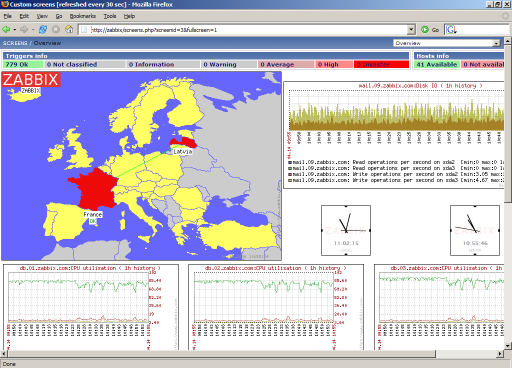
长相是这样,大家先有个笼统的印象吧
有个linux必须的我使用的是centos5.6手头有这个,折腾网弄了半天,最后dhclient好了,然后最好先yum upgrade好。悲催的,忘了改源了。
yum install yum-fastestmirror -y
希望看到这篇文章的人不要忘了这个。
1.4和1.6的都有pdf手册,为啥1.8的就要在线看呢,悲剧的。
http://www.zabbix.com/documentation.php
| Name | Platform | CPU/Memory | Database | Monitored hosts |
|---|---|---|---|---|
| Small | Ubuntu Linux | PII 350MHz 256MB | MySQL MyISAM | 20 |
| Medium | Ubuntu Linux 64 bit | AMD Athlon 3200+ 2GB | MySQL InnoDB | 500 |
| Large | Ubuntu Linux 64 bit | Intel Dual Core 6400 4GB | RAID10 MySQL InnoDB or PostgreSQL | >1000 |
| Very large | RedHat Enterprise | Intel Xeon 2xCPU 8GB | Fast RAID10 MySQL InnoDB or PostgreSQL | >10000 |
鉴于日益不稳定的网络局势,动不动博客就有被和谐的可能,所以觉得也应该狡兔三穴,blog也备份一个以防万一
首先先决条件,你有两个blog,都为wordpress(版本我不知道是否要相同了,反正我的是相同了。)
其中假设A是主要博客,B是在sae博客(不懂的自己研究去,我是这么干的而已)
1
如果要求是是从A同步到B的话,在B的控制面板,点击设置》撰写》在右边
| XML-RPC |
|---|
上打钩,这样子就允许从A发过来的文章在B发表

2
在A上安装插件Syndicate Out,可以在http://wordpress.org/extend/plugins/syndicate-out/上下载
下载好,上传到 /wp-content/plugins/ 目录下
然后再在A的控制面板后面点插件,找到Syndicate Out,点启用
再在后台点设置》Syndicate,在右边填上B的主页地址,用户名密码,点add

这样子就可以实现从A到B的同步了,想双向同步再按照同样的方法再来一次
ps.但是也发现了很难受的问题,比如固定连接标题,发的地方是我更改后的标题,但是同步的确是默认的文章名,其次,图片也是原网站的地址,很不和谐,不是完美解决方案
好的是编辑的时候也会两边同步,图片是个问题啊~~~
鉴于日益不稳定的网络局势,动不动博客就有被和谐的可能,所以觉得也应该狡兔三穴,blog也备份一个以防万一
首先先决条件,你有两个blog,都为wordpress(版本我不知道是否要相同了,反正我的是相同了。)
其中假设A是主要博客,B是在sae博客(不懂的自己研究去,我是这么干的而已)
1
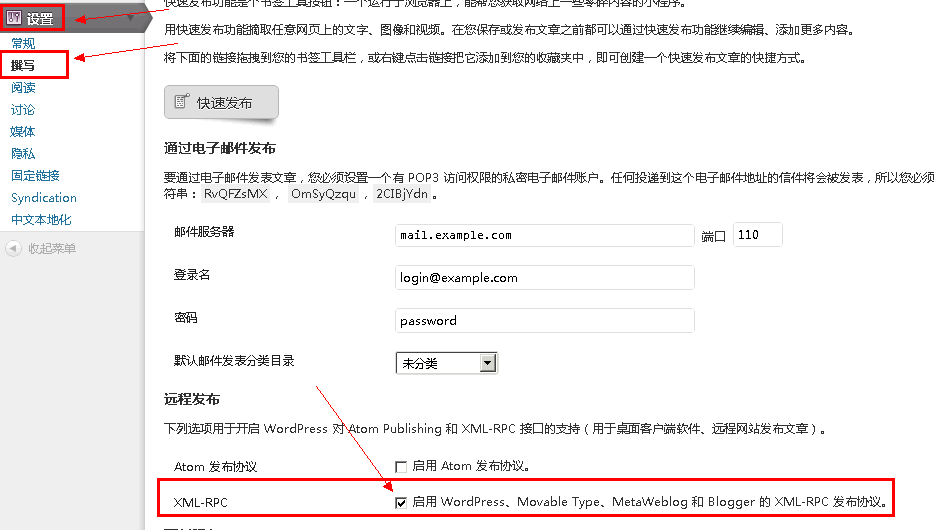
如果要求是是从A同步到B的话,在B的控制面板,点击设置》撰写》在右边
| XML-RPC |
|---|
上打钩,这样子就允许从A发过来的文章在B发表
2
在A上安装插件Syndicate Out,可以在http://wordpress.org/extend/plugins/syndicate-out/上下载
下载好,上传到 /wp-content/plugins/ 目录下
然后再在A的控制面板后面点插件,找到Syndicate Out,点启用
再在后台点设置》Syndicate,在右边填上B的主页地址,用户名密码,点add
这样子就可以实现从A到B的同步了,想双向同步再按照同样的方法再来一次
ps.但是也发现了很难受的问题,比如固定连接标题,发的地方是我更改后的标题,但是同步的确是默认的文章名,其次,图片也是原网站的地址,很不和谐,不是完美解决方案
好的是编辑的时候也会两边同步,图片是个问题啊~~~
所使用的为wp的插件http://wordpress.org/extend/plugins/syndicate-out/看是否能同步到两个blog上,这个是在sae.com的顶级域名上完成的。